
The Best Google Analytics Alternatives for WordPress in 2026
For nearly two decades, Google Analytics has been the default tool for understanding website traffic. It’s powerful, integrates with a vast ecosystem, and is free to use. For many website owners, it has long been the standard choice.
But the web has changed. A growing focus on site performance (Core Web Vitals), a global shift towards user privacy (GDPR, CCPA), and a preference for simpler workflows have led many WordPress site owners to search for Google Analytics alternatives.
The good news is that the ecosystem has matured. Today, there are several excellent options available, each with its own unique philosophy, strengths, and trade-offs. This guide provides a fair comparison of some of the most popular Google Analytics alternatives for WordPress to help you choose the solution that best fits your needs.
What to Look for in a Google Analytics Alternative
Before comparing the tools themselves, it helps to define the criteria that matter most for modern WordPress websites.
1. Performance
How lightweight is the tracking system? Does it have a noticeable impact on page loading speed or Core Web Vitals?
2. Privacy & Data Ownership
Where is the analytics data stored? Does the platform rely on cookies? How easily can it fit into a privacy-focused setup?
3. Ease of Use & Integration
Is the interface intuitive? Does the analytics experience integrate naturally with WordPress?
4. Actionable Insights
Does the tool provide useful reports that help improve content, marketing, and user engagement without unnecessary complexity?
Defining “Performance Impact”
Before we compare these tools, we must define what we mean by “site speed impact.” For this analysis, we are specifically focused on Core Web Vitals (CWV) as measured by Google PageSpeed Insights (Mobile).
An analytics tool is considered to have an impact only if it measurably affects metrics like First Contentful Paint (FCP), Largest Contentful Paint (LCP), or Total Blocking Time (TBT).
A tracking method is considered to have no measurable CWV impact if it meets these strict criteria:
- It loads asynchronously (does not block rendering).
- It has a negligible file size (typically <10KB).
- It executes outside the critical rendering path.
- It uses non-blocking background requests (like the navigator sendBeacon API) to send data.
While such a script will appear in a network waterfall, its execution profile is so light that it does not meaningfully influence your PageSpeed scores. In this context, “no measurable CWV impact” means the script does not affect Core Web Vitals metrics under standard Lighthouse mobile testing conditions.
With these strict criteria in mind, let’s look at how the top contenders stack up.
The Top Contenders: A Comparison
Features vs Tools | Plausible | Fathom | Matomo (On-Premise) | WP Statistics | Independent Analytics | WP Insights Pro |
|---|---|---|---|---|---|---|
Data Hosting | Cloud (EU) | Cloud (EU/US) | Self-Hosted | Self-Hosted | Self-Hosted | Self-Hosted |
Site Speed Impact | Minimal (Async external JS) | Minimal (Async external JS) | Low–Medium (Heavier JS + features) | Minimal front-end impact; database load may increase under high traffic | Minimal front-end impact; moderate database usage on large sites | No measurable CWV impact; no database writes for tracking |
Cookieless | Yes | Yes | Optional | Yes | Yes | Yes |
Interface | External | External | Inside WordPress / External | Inside WordPress | Inside WordPress | Inside WordPress |
Database Usage | N/A | N/A | High on large sites | Moderate to High | Moderate | Does not use the WP Database for logs |
Pricing Model | Pageview-based | Pageview-based | Free (paid add-ons) | Free (paid add-ons) | Free (paid add-ons) | Site-based license |
In-Depth Reviews
Plausible & Fathom Analytics
Plausible and Fathom are often mentioned together because they share a similar philosophy. Both are privacy-focused, lightweight, and intentionally simple to use.
Strengths- Lightweight tracking scripts
- Clean and minimal dashboards
- Cookieless by default
- Designed with privacy compliance in mind
Both platforms are cloud-based SaaS products, meaning your analytics data is stored on external servers rather than inside WordPress. Their pricing is also traffic-based, which can become more expensive for larger websites.
Best for: Site owners who want a lightweight, privacy-focused analytics solution with a simple hosted dashboard.
Matomo (Self-Hosted)
Matomo is one of the most established open-source analytics platforms available today. It can be self-hosted either as a standalone analytics platform or through its WordPress integration, giving users full control over their analytics data.
Strengths- Extremely feature-rich
- Strong data ownership and privacy controls
- Offers reporting depth comparable to Google Analytics
- Flexible hosting options
Matomo is significantly more complex than many alternatives. On high-traffic websites, its standard database-driven tracking and reporting system can generate large analytics tables depending on traffic and configuration and may require additional server resources to maintain optimal performance.
Best for: Technically advanced users and organizations that need a highly detailed, self-hosted analytics platform.
WP Statistics
WP Statistics is one of the longest-running WordPress analytics plugins and remains a popular privacy-focused option for self-hosted analytics.
Strengths- Fully self-hosted
- Extensive built-in reports
- Large feature set
- Strong WordPress integration
- Generous free version
Because of its broad reporting capabilities and database-driven tracking and reporting architecture, larger websites may experience increased database size and heavier admin-side processing over time.
Best for: Users who want a traditional WordPress-native analytics plugin with extensive reporting features.
Independent Analytics
Independent Analytics is a popular WordPress-native analytics plugin that focuses on simplicity and ease of use.
Strengths- Easy setup
- Clean dashboard integrated directly into WordPress
- Tracks core metrics without relying on external services
- Good free feature set
Like many WordPress analytics plugins, it stores tracking data in WordPress database tables. On larger or long-running websites, this can contribute to gradual database growth. Some advanced features, including enhanced event tracking, are available in the Pro version.
Best for: Bloggers and small business websites looking for a straightforward, WordPress-native analytics solution.
WP Insights Pro
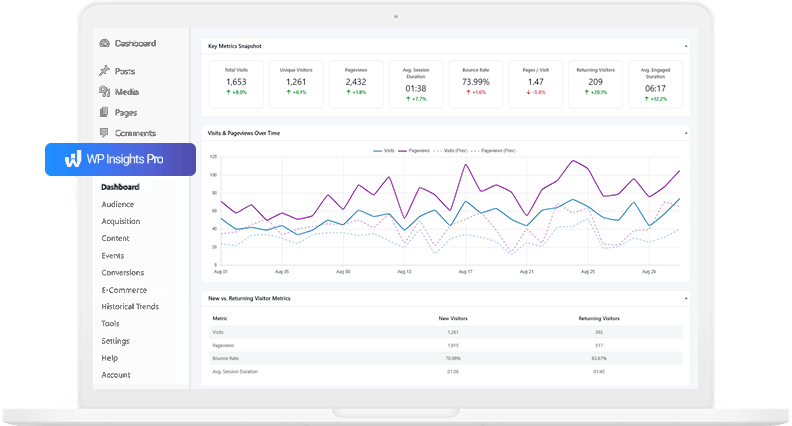
WP Insights Pro is a performance-focused analytics plugin that emphasizes self-hosted data ownership and deep WordPress integration, while keeping tracking lightweight.
Strengths- Uses a file-based tracking approach instead of storing analytics data in WordPress database tables
- Designed to reduce database usage on larger sites
- Performs report processing in the background
- Includes event and conversion tracking features
- Includes advanced Conversion Attribution to identify which pages, authors, categories, and post types contribute most to conversions, and e-commerce revenue attribution for WooCommerce stores
- Automatically detects and categorizes traffic from supported AI platforms such as ChatGPT, Perplexity, Claude, and Gemini
- Integrated into the WordPress dashboard
- Privacy-focused and cookieless by default
- Generates white-labeled PDF reports directly from the dashboard
WP Insights Pro is a premium-only plugin and does not currently offer a free version. Its reporting approach focuses on practical analytics and core metrics rather than replicating the full complexity of enterprise analytics suites.
Best for: Performance-conscious developers, agencies, and business owners who want a self-hosted analytics solution with low database overhead and WordPress integration.
Conclusion: Choosing the Right Tool for the Job
There is no single “best” Google Analytics alternative for every WordPress website. The right choice depends largely on your priorities, technical preferences, and workflow.
- If you value simplicity and a hosted dashboard experience, Plausible and Fathom are strong options.
- If you need a highly flexible open-source platform and have the resources to manage it, Matomo remains one of the most capable solutions.
- If you prefer a free WordPress-native plugin with many built-in reporting, WP Statistics and Independent Analytics are common starting points.
- If you prioritize long-term performance, database efficiency, and a fully integrated analytics experience inside WordPress, WP Insights Pro fits that use case.
Ready for Zero-Bloat Analytics?