How to Track AI Search Traffic in WordPress (ChatGPT, Perplexity & More)
The way people discover information online is changing. Traditional search engines remain important, but more people are also using AI assistants and conversational search tools to research topics, compare products, and discover websites.
When these tools link to your content, they can send visitors directly to your site.
Until now, this traffic could appear in different places within your analytics. A visit from an AI platform might appear as a standard referral, such as chatgpt.com or perplexity.ai. Depending on the platform, how the link is opened, and the available referrer information, some visits may also appear differently.
As a result, it can be difficult to get a clear picture of how much traffic AI platforms are actually sending to your site.
WP Insights Pro now makes it easier to identify and analyze AI traffic in WordPress by grouping recognized visits into a dedicated channel.
Introducing the “AI Search & Assistants” Channel
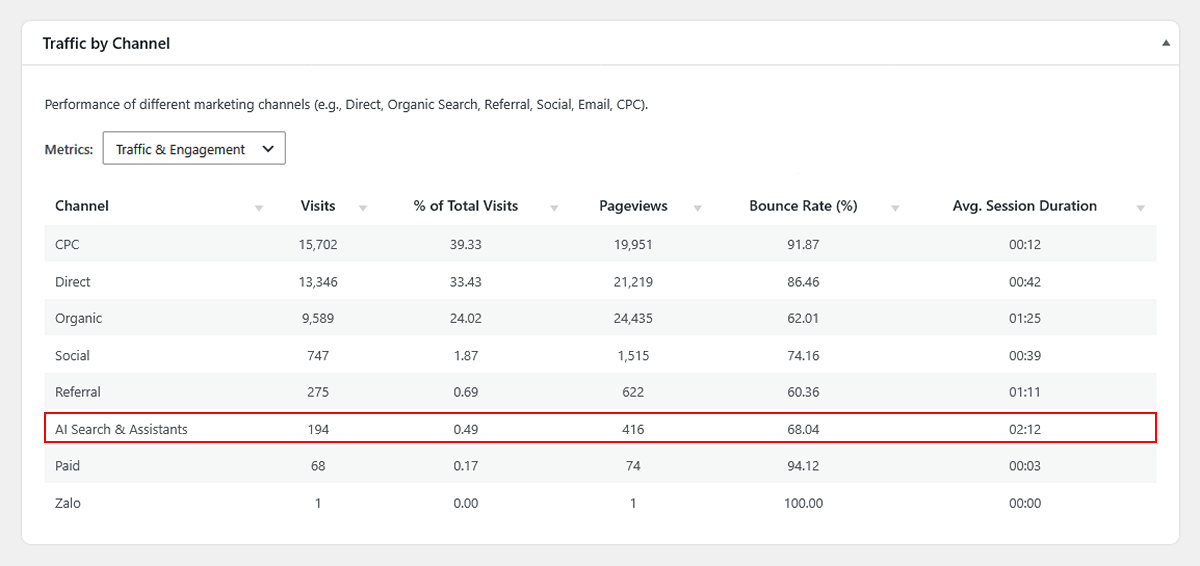
WP Insights Pro automatically recognizes supported AI platforms and groups their traffic into a dedicated AI Search & Assistants channel.
Instead of appearing only as separate referrers, recognized AI traffic can now be viewed alongside your other acquisition channels, such as Organic, Social, Direct, and Referral.
How the Classification Works
WP Insights Pro recognizes supported AI platforms from the available source and referrer information, then groups them under a consistent AI channel.
Currently, the engine automatically recognizes and groups traffic from:
- ChatGPT
- Perplexity
- Claude
- Google Gemini
- Poe, Phind, and You.com
When a supported AI source can be identified, the plugin assigns the visit to the ai medium, grouping it with other recognized AI traffic in your acquisition reports.
As with any referrer-based traffic classification, some visits may not include enough source information to be identified automatically.
Analyzing Your AI Traffic
Once classified, AI traffic can be analyzed alongside your other acquisition channels. You can compare engagement, landing pages, and conversion activity to see how visitors from AI platforms interact with your site.
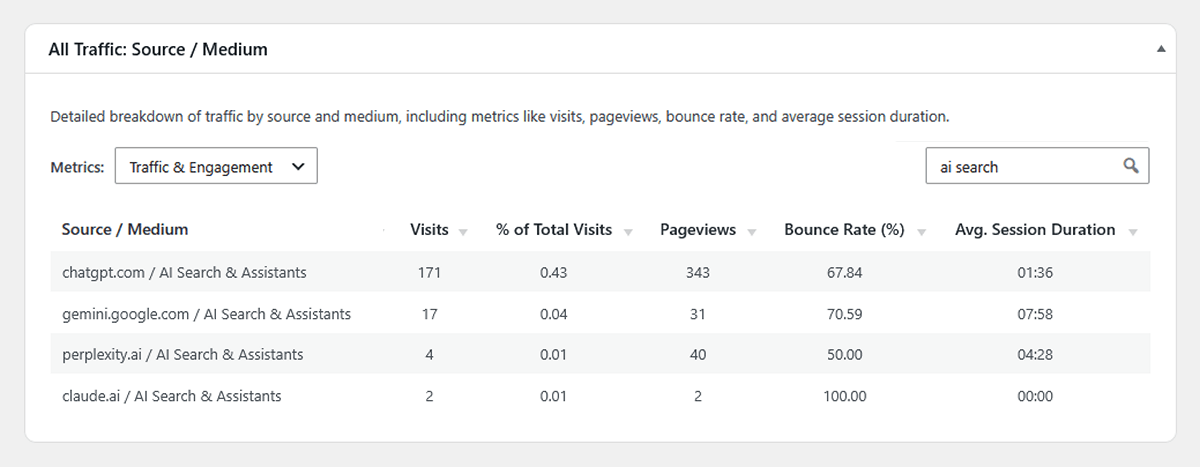
If you want to see exactly which platforms are sending you visitors, you can navigate to the All Traffic report. Here, you will see the specific source (e.g., perplexity.ai) paired with the new ai medium.
Because this channel is integrated into the rest of the plugin, you can also analyze how visitors from AI platforms engage with your site and contribute to conversions. You can see how long visitors from ChatGPT stay on your site, which landing pages they arrive on, and—if you are using the Conversion Attribution features—how much revenue or how many goal completions they drive.
Moving Forward
AI platforms and the ways they send traffic to websites will continue to evolve. As new sources become relevant and identifiable, we can expand the detection engine to support them.
The goal is simple: make AI-driven traffic easier to identify and analyze alongside the rest of your acquisition data.
This feature was introduced in WP Insights Pro 1.3.1. If you are already using WP Insights Pro, update to version 1.3.1 or later to start seeing recognized AI traffic categorized automatically in your reports. If you’re looking for a clearer way to understand where your visitors come from and what they do after arriving, explore our features.
Ready for Zero-Bloat Analytics?