
Built on a Rock-Solid Foundation
Every feature in our analytics plugin is built on three core principles: fast performance, strong data privacy, and maintaining a lean, stable WordPress site.
Blazing Fast, by Design
Analytics shouldn’t slow down your website. Our ultra-lightweight tracking script is asynchronous and dependency-free. Tracking never writes to your WordPress database, ensuring zero impact on front-end speed or back-end performance.
100% Your Data
All of your analytics data is stored securely on your own server—nowhere else. With cookieless tracking by default and built-in IP anonymization, you can respect your visitors’ privacy and simplify GDPR compliance, no third parties required.
A Clean Database, Guaranteed
Say goodbye to the bloated tables that cripple other analytics plugins. Our intelligent file-based logging and SQLite processing pipeline means your WordPress database stays lean, your backups stay small, and your site remains stable, even with millions of pageviews.
The Engine Behind Our Features
WP Insights Pro runs on a high-performance architecture designed specifically for the realities of WordPress hosting. Instead of filling your database with millions of analytics rows, we use a modern file-based logging pipeline that keeps your site fast, clean, and stable — even at scale. Explore the engineering behind our features →
1. Ultra-Light Tracker
A tiny asynchronous tracking script that loads instantly and runs independently from WordPress. No cookies, no render-blocking resources, and absolutely no impact on your front-end speed.
2. Log-Based Storage
All visit activity is recorded in compact daily log files rather than your WordPress database. This prevents table bloat, keeps backups small, and makes long-term retention more efficient.
3. Background SQLite Engine
A dedicated background worker processes log data in isolated SQLite batches. This approach eliminates real-time database stress and ensures performance even on shared hosting.
4. Instant-Loading Reports
Once processing is complete, reports are saved as optimized JSON files, allowing your dashboard to load analytics instantly — even with large datasets.
All Your Key Metrics, Beautifully Integrated
Access all the key features of our WordPress analytics plugin, providing clear, actionable insights directly within your dashboard.
THE DASHBOARD
Your Website’s Command Center
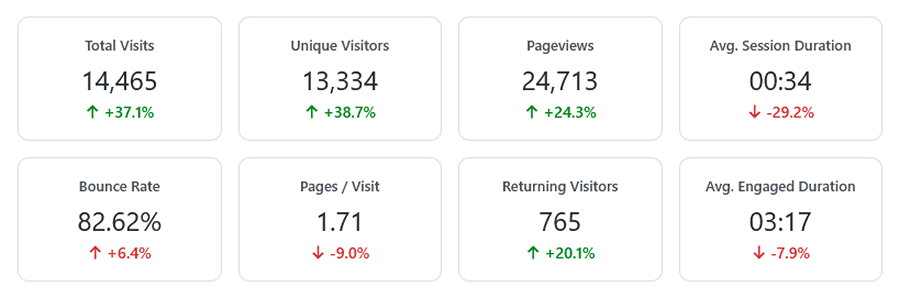
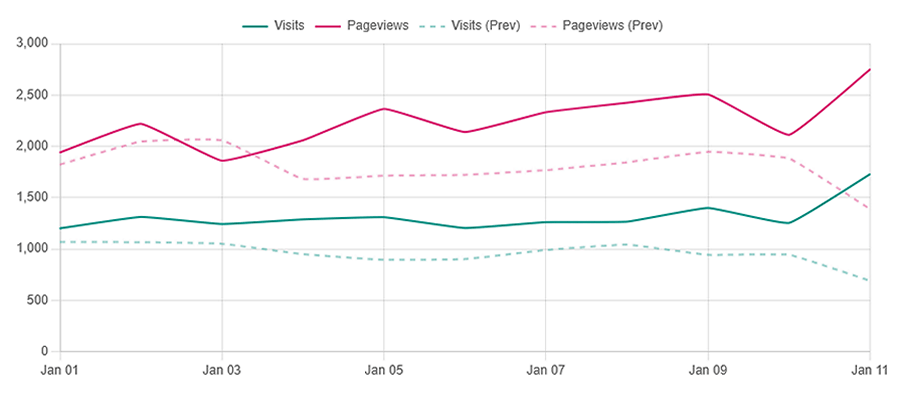
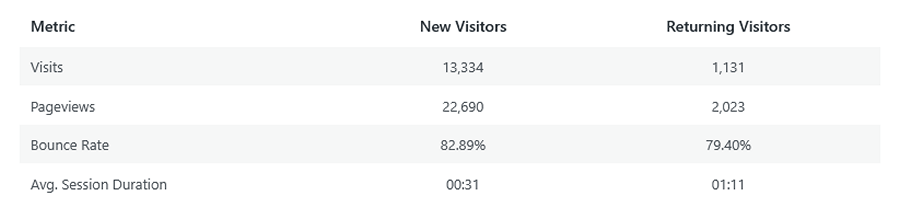
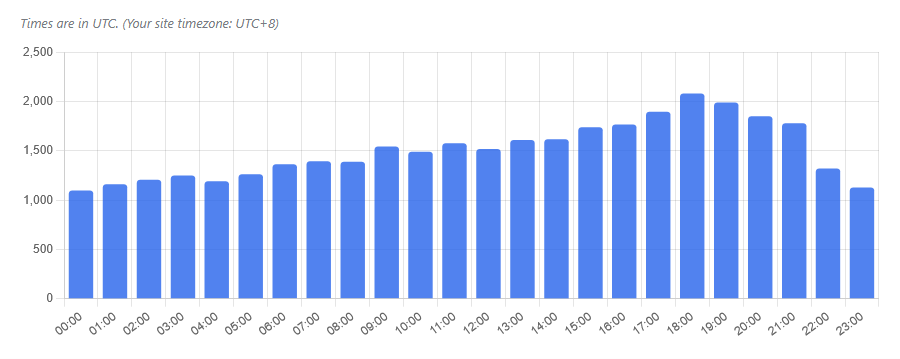
Get a complete, at-a-glance overview of your site’s performance the moment you log in. Our main dashboard brings your most important metrics together, from traffic trends and top content to key acquisition channels and visitor loyalty.

AUDIENCE INSIGHTS
Understand Who Your Visitors Are
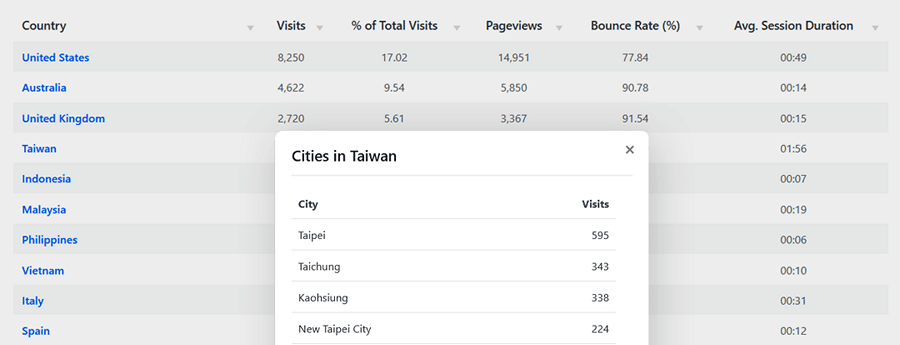
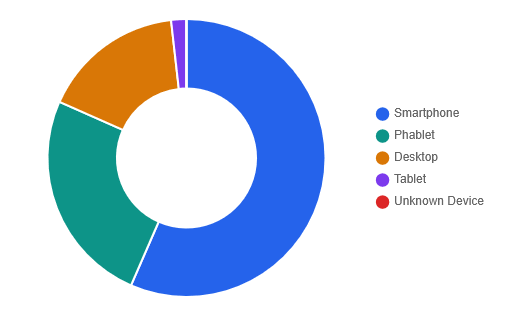
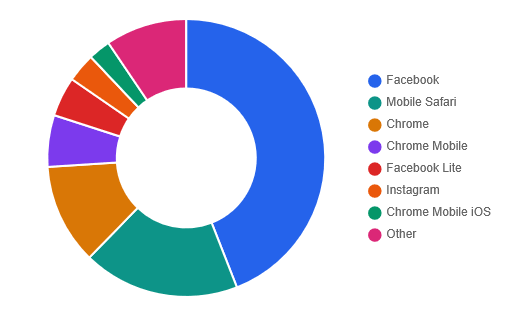
Go beyond simple visitor counts. Discover where your audience comes from with accurate geolocation data. Learn what browsers, devices, and operating systems they use to access your site, helping you optimize your user experience.



ACQUISITION & TRAFFIC SOURCES
Discover How They Find You
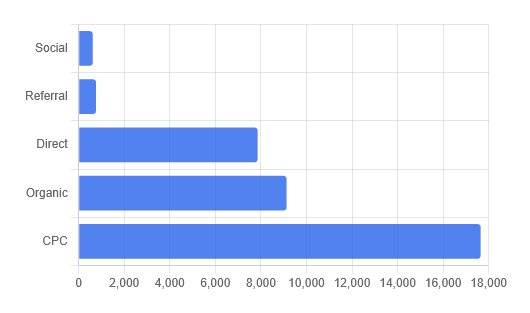
Pinpoint your most effective marketing channels. Our advanced attribution system automatically categorizes your traffic from social media, search engines, ad campaigns, and referring sites. Track UTM campaigns and custom parameters, then see which sources drive visits, goal completions, and e-commerce revenue.
CONTENT PERFORMANCE
Know What Content Resonates
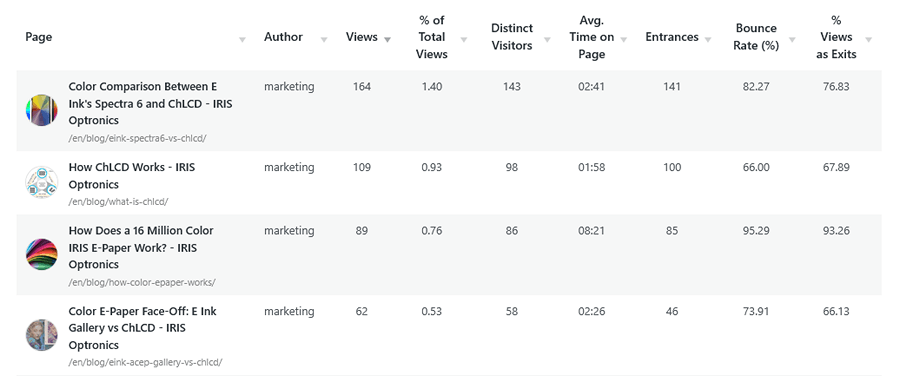
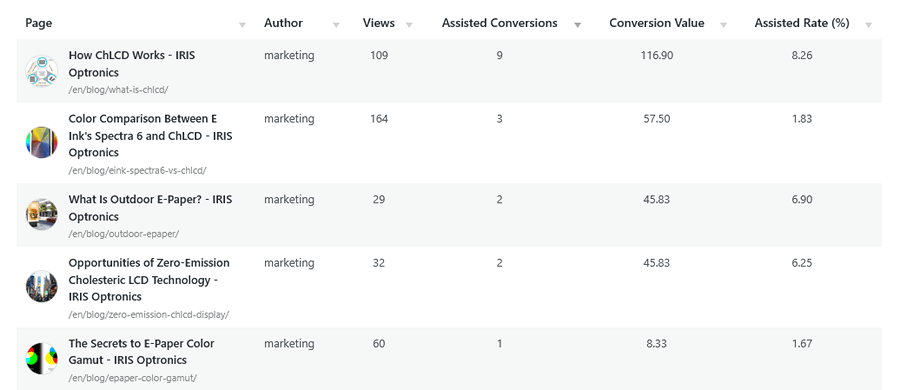
Identify your most popular and engaging content. See which pages get the most views, which ones are the most common entry points for new visitors (Landing Pages), and which pages are most likely to be the last one a user sees (Exit Pages). Then use Conversion and E-Commerce Attribution to understand which content contributes to goal completions and revenue.
WORDPRESS-NATIVE INSIGHTS
Understand Why Your Content Performs
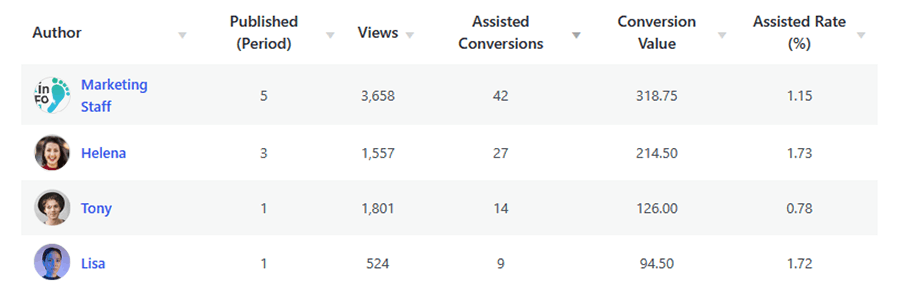
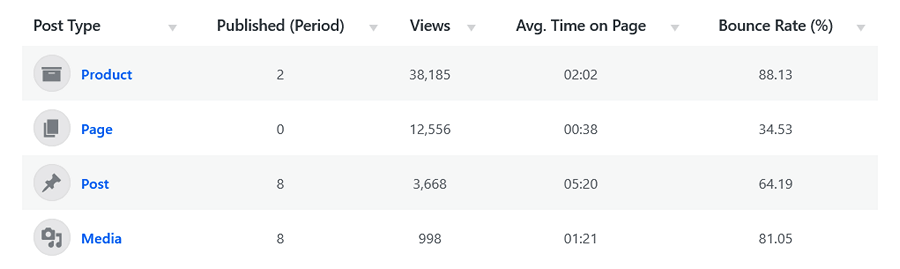
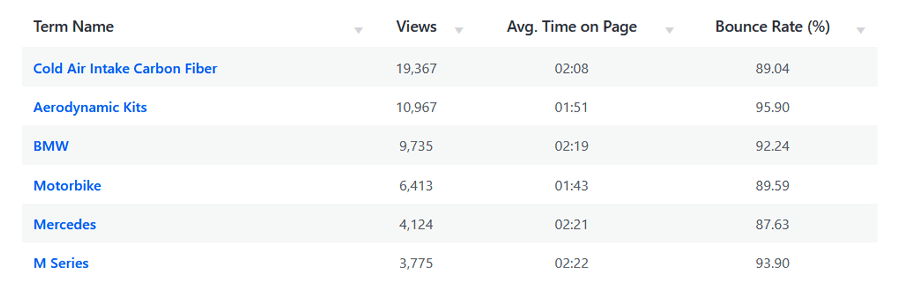
Go beyond simple URL tracking. Analyze your WordPress content by author, post type, category, and tag to see what attracts visitors, engages them, and contributes to conversions and e-commerce revenue. WP Insights Pro also tracks internal search behavior and 404 errors to reveal how users discover and navigate your site.
Measure What Truly Matters: Your Business Goals
These tracking features allow WP Insights Pro to go beyond basic traffic monitoring, providing detailed data for understanding user interactions, goal conversions, and e-commerce revenue.
NO-CODE EVENT TRACKING
Track Any Interaction
Don’t just track pageviews—track actions. Our “No-Code” event tracker lets you measure key user interactions like clicks, form submissions, and element views with dwell time. You can also automatically track all outbound links and file downloads. Simply define what you want to track in the settings, and let the plugin handle the rest—no coding required.
POWERFUL GOAL CONVERSION
Define Your Success
Turn raw data into business intelligence. With our simple Goal system, you can define any key action as a conversion—a “thank you” page visit, a newsletter signup, or a contact form submission. See your overall conversion rate and discover which traffic sources and landing pages contribute most to conversions. You can even drill down into a specific conversion to explore its Goal Journey and see the pages visitors viewed before completing it.
E-COMMERCE REVENUE ATTRIBUTION
Track Sales, Not Just Clicks
Connect WooCommerce purchases and revenue to the traffic sources, campaigns, and content that contributed to the sale. WP Insights Pro records purchase data server-side and validates orders against their current status, giving you a reliable view of e-commerce performance alongside your existing analytics.
A Toolkit Built for Professionals
The plugin includes features for power users, agencies, and anyone who needs detailed analytics and data management tools.
Advanced Trend Analysis
Compare the historical performance of multiple pages, authors, post types, categories, campaigns, and goals on a single chart. Analyze traffic, engagement, and conversion trends over time.
Performance Overlays
Visualize your progress instantly. The main dashboard chart overlays current visits and pageviews against the previous period as a dashed comparison line.
Professional Reports & Data Export
Generate professional PDF reports for clients and stakeholders, export CSV files for spreadsheet analysis, or access raw JSON data for advanced workflows and integrations.
Smart Data Management
Configure custom data retention policies to automatically manage file sizes and keep your analytics system efficient over time. Built for long-term reliability.
Automated Email Digests
Stay informed without logging into WordPress. Receive a clean, mobile-friendly performance summary every week or month, including traffic trends, key metrics, top pages, and top traffic sources.