
How to Track WooCommerce Sales & Attribute Revenue to Your Content
If you run a WooCommerce store, you already know exactly what you are selling. Your store dashboard provides a clear record of every order, the products purchased, and your total daily revenue.
However, knowing what sold is only the final step of the customer journey. Understanding how that sale happened—which marketing campaign brought the visitor to your site, and which blog posts or guides they read before checking out—is often much harder to determine.
Standard traffic reports tell you where visitors come from, and store reports tell you what they bought. Connecting the two requires reliable WooCommerce revenue attribution.
Version 1.4.0 adds WooCommerce sales tracking and revenue attribution to WP Insights Pro. You can now see which traffic sources and pieces of content contributed to sales.
A More Reliable Approach to Tracking Purchases
Many analytics implementations for WooCommerce rely on front-end JavaScript tracking. When a customer reaches the “Order Received” page, a script fires in their browser to tell the analytics platform that a sale occurred.
While this method is common, it is becoming less reliable. Privacy-focused browsers (like Safari and Brave), tracking-prevention features such as Intelligent Tracking Prevention (ITP), and standard ad-blockers can interfere with front-end tracking. As a result, browser-based tracking can record fewer purchases than the store itself.
WP Insights Pro handles purchase tracking differently, without relying on the customer’s browser. The e-commerce integration hooks directly into WooCommerce on your server. When a valid order is processed, its revenue data is recorded server-side and linked to the visitor’s existing session. Because the purchase event does not depend on the customer’s browser executing a tracking script, it is less susceptible to browser-level ad-blocking and tracking restrictions.
The New E-Commerce Dashboard
If WooCommerce is active on your site, updating to version 1.4.0 will automatically reveal a new “E-Commerce” tab in your WP Insights Pro menu.
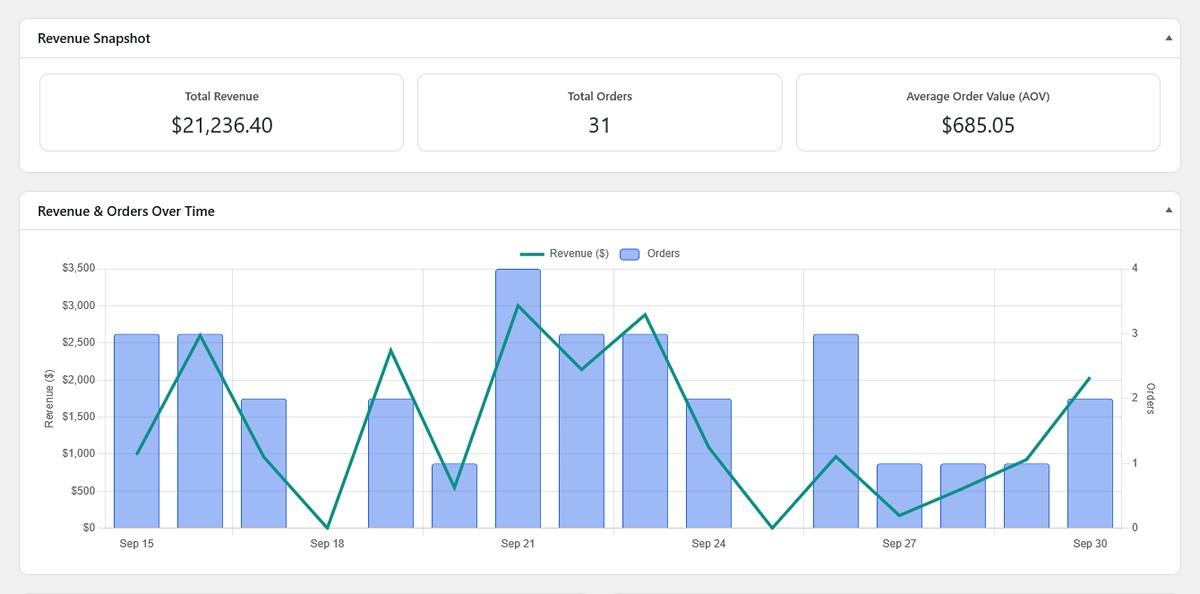
This dedicated dashboard serves as your high-level overview. It provides your core scorecards—Total Revenue, Total Orders, and Average Order Value (AOV)—alongside a dual-axis chart that plots your daily or hourly sales trends.
Below the charts, you will find quick-reference tables summarizing your top revenue-generating acquisition sources and your top assisting content.
WooCommerce Revenue Attribution Across Your Reports
While the dedicated dashboard is helpful for a quick snapshot, e-commerce data is also integrated into your existing reports.
Across all of your Acquisition reports (Channels, Referrals, Campaigns, and Advertising), you will notice a new “Metrics” dropdown menu above the data tables. By switching this toggle from “Traffic & Engagement” to “E-commerce Attribution”, the table columns instantly update to show your sales data.
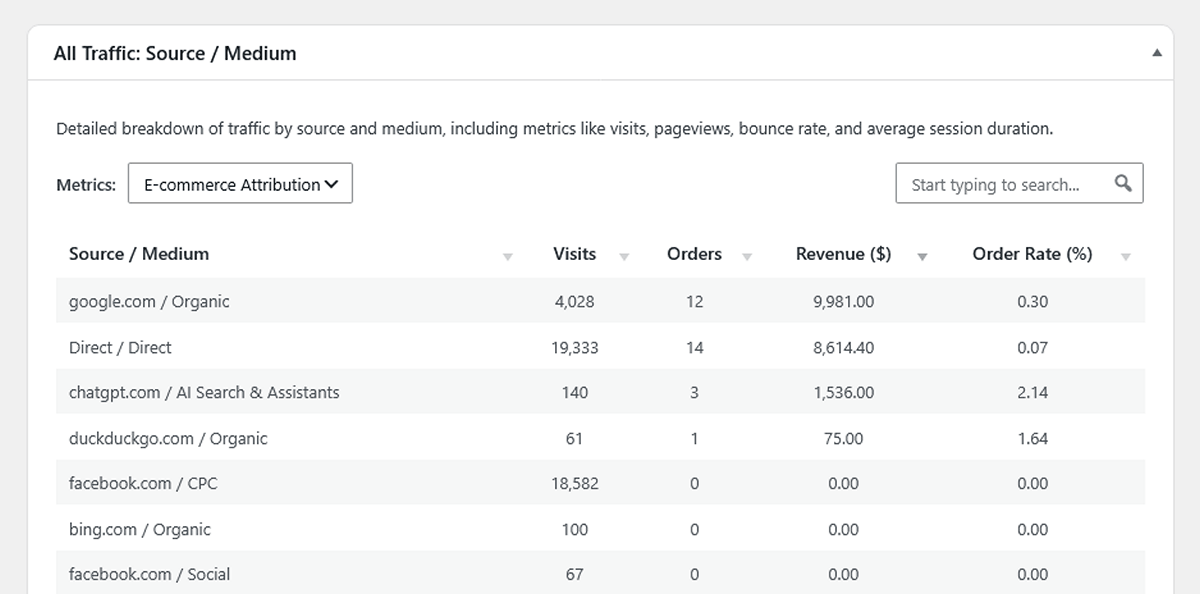
Instead of guessing if a specific Facebook Ad or a particular email newsletter campaign was successful based on bounce rates, you can now see the orders and total revenue attributed to that specific source.
Measuring Content ROI
In our previous update, we introduced the concept of measuring true content ROI by tracking assisted goal conversions. Version 1.4.0 applies this same linear attribution model to WooCommerce sales revenue.
When a customer makes a purchase, WP Insights Pro looks at the pages they viewed during that session before checking out. The revenue of the order is then distributed evenly across the eligible pages in that journey.
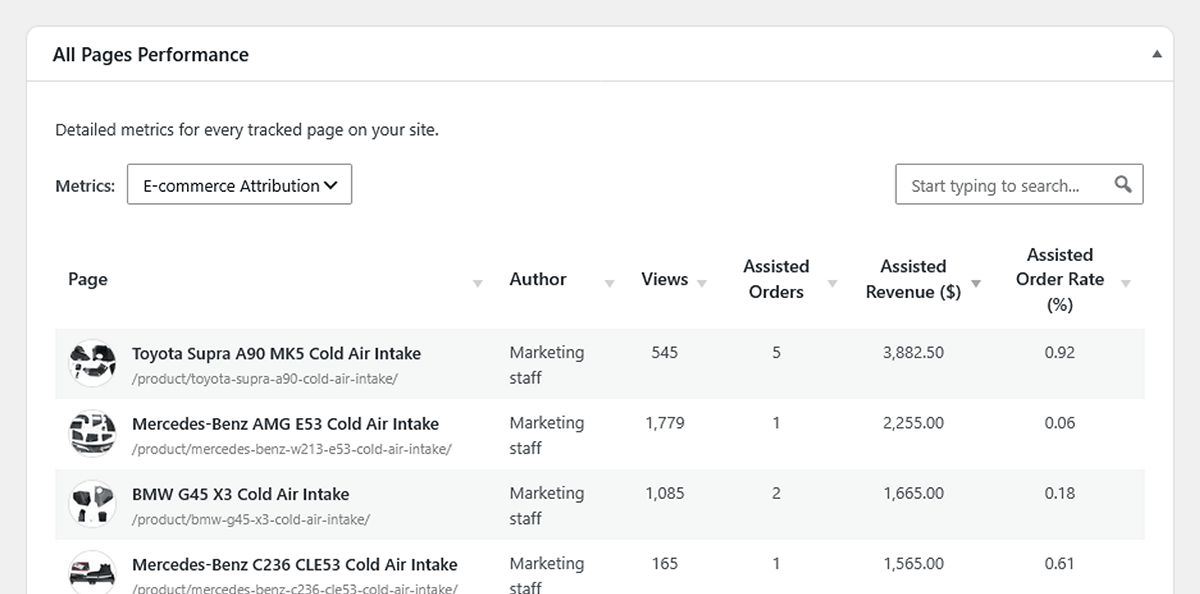
By switching the Metrics toggle to “E-commerce Attribution” in your Content reports, you can sort your Authors, Categories, and individual Blog Posts by the amount of Assisted Revenue they generated.
This helps answer critical editorial questions: Does our in-depth buying guide contribute to sales? Which author’s product reviews contribute the most orders and revenue?
Note: You can easily exclude utility pages—like your /cart/ or /checkout/ URLs—from receiving this attribution credit via the new E-commerce Settings, ensuring your data remains focused on your actual marketing content.
Moving Forward
Understanding the relationship between how people find your site, what they read, and what they buy is essential for growing an online store. By integrating server-side e-commerce tracking directly into your WordPress dashboard, we hope to make finding those connections much simpler.
This integration is available now in version 1.4.0. If you already use WP Insights Pro with WooCommerce, update the plugin to start using the new e-commerce reports. To learn more about WP Insight Pro and its e-commerce capabilities, explore our features or view our pricing plans.
Ready for Zero-Bloat Analytics?