
Beyond Pageviews: How to Measure WordPress Content ROI
When evaluating website performance, pageviews are usually the first metric we look at. It is satisfying to see traffic numbers go up, and high pageviews certainly indicate that people are finding your site.
However, traffic alone doesn’t generate customers.
A blog post with 10,000 views that rarely leads to a meaningful action may be far less valuable to your business than a highly targeted article with only 500 views that consistently helps convert visitors into leads or clients.
When planning your content strategy, the most important question isn’t always “Which pages get the most traffic?” Often, it is much more useful to ask: “Which pages actually help my business grow?”
Answering this requires looking beyond basic traffic metrics and understanding WordPress content ROI.
The Problem: Supporting Content Gets No Credit
Visitors rarely convert after reading a single page. A typical user journey on a website is usually a multi-step process. It might look something like this:
- Read an educational blog article (Entry point)
- Click to read another related article
- Check the pricing page
- Read the FAQ
- Submit the contact form (Conversion)
Most standard analytics reports are great at telling you where a visitor entered your site (the landing page) or where they finally converted (the goal page).
What they frequently fail to show is the content in the middle—the articles and pages that educated the visitor, built trust, and helped move them toward that final conversion. As a result, valuable supporting content receives little or no recognition in standard reporting.
Why This Matters
Imagine you are sitting down at the end of the month to decide which articles to update, or which topics to focus your budget on for the next quarter.
If you have to choose between an article with 20,000 pageviews and an article that is associated with thousands of dollars in attributed conversion value, the choice becomes much clearer. But without a way to attribute those conversions, you are forced to rely solely on the first metric. You risk investing time and resources into topics that attract eyeballs but do not contribute to your actual goals.
The Solution: Conversion Attribution
To help bridge this gap, we’ve introduced a new Conversion Attribution view in WP Insights Pro (available in version 1.3.0).
The goal of WordPress conversion attribution is to distribute credit among the pages a user interacted with before completing a goal. To do this, WP Insights Pro uses a straightforward “Linear Attribution” model based on the user’s session journey.
Here is a simple example of how it works:
Let’s say a visitor reads three different articles on your site before submitting a quote request form (a Goal with a defined value of $300) or before purchasing a $300 product from your WooCommerce store.
Because all three articles were viewed during that converting session, WP Insights Pro distributes the attribution credit evenly across the journey. Each of the three articles receives:
- 1 Assisted Conversion (or 1 Assisted Order)
- $100 of attributed Conversion Value (or Assisted Revenue)
Instead of assigning the conversion value only to the first or final page, the value is distributed evenly across the pages included in that converting session.
What You Can Discover
You can access these new metrics directly within your WordPress dashboard. Here is what the new reporting views reveal.
All Pages (Conversion Attribution View)
At the top of your detailed content reports, you will now see a “Metrics” toggle. Switching this from “Traffic & Engagement” to “Conversion Attribution” changes the data displayed in the table.
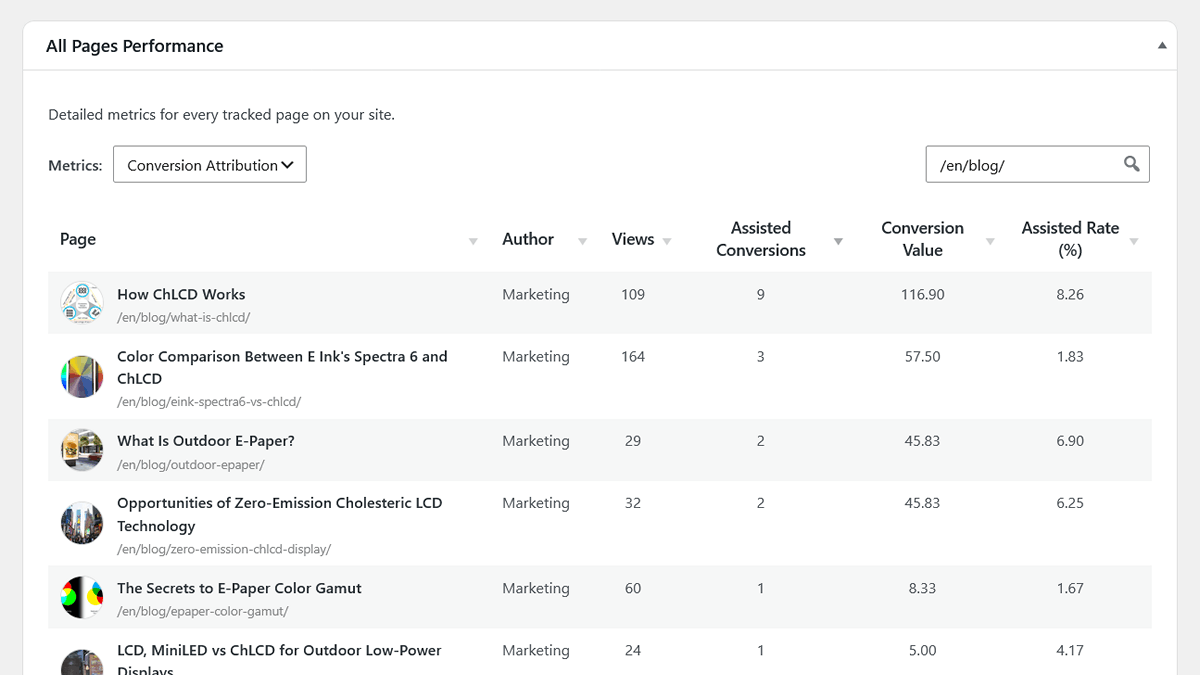
Instead of sorting your pages by views, you can now sort them by Assisted Conversions or Conversion Value. This highlights the content with the highest attributed Conversion Value. It also displays an Assisted Rate (%), which tells you what percentage of views on a specific page occurred during sessions that eventually led to a conversion.
The example above shows why looking at traffic alone can be misleading. “Color Comparison Between E Ink’s Spectra 6 and ChLCD” has the most views in the table, but “How ChLCD Works” has three times as many Assisted Conversions and a much higher Assist Rate. The latter may therefore deserve more attention when deciding which content to update, promote, or build upon, even though it attracts less traffic.
The Goal Journey Drill-Down
If you want to look at things from the perspective of the conversion rather than the content, you can use the Single Goal dashboard.
By clicking on any specific goal in your Conversions report, you can view the “Top Assisting Pages” table. This shows the pages most frequently viewed during sessions that resulted in that specific goal, helping you understand which content commonly contributes to those conversions.
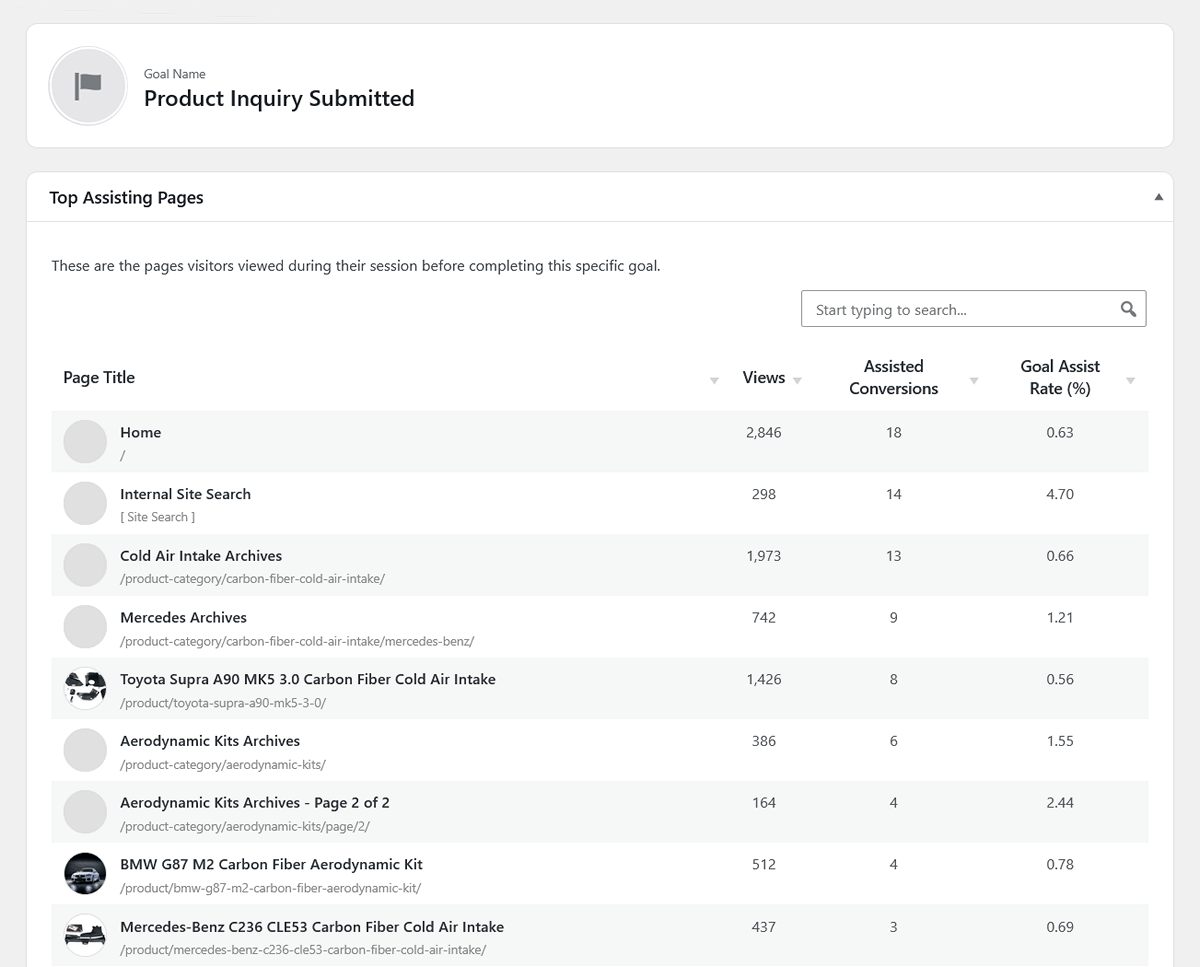
The numbers can reveal patterns that a traffic report alone would miss. In this example the Home page has the most views and the highest number of Assisted Conversions, but its Goal Assist Rate is only 0.63%. By comparison, the Aerodynamic Kits category has far fewer views but a 1.55% assist rate, while its second page has a 2.44% rate. For an e-commerce site, this could be a useful signal to give that product category more marketing attention and investigate whether further promotion could generate additional conversions.
Analyzing WordPress Content Structures
Because WP Insights Pro understands native WordPress structures, you don’t just have to look at individual URLs.
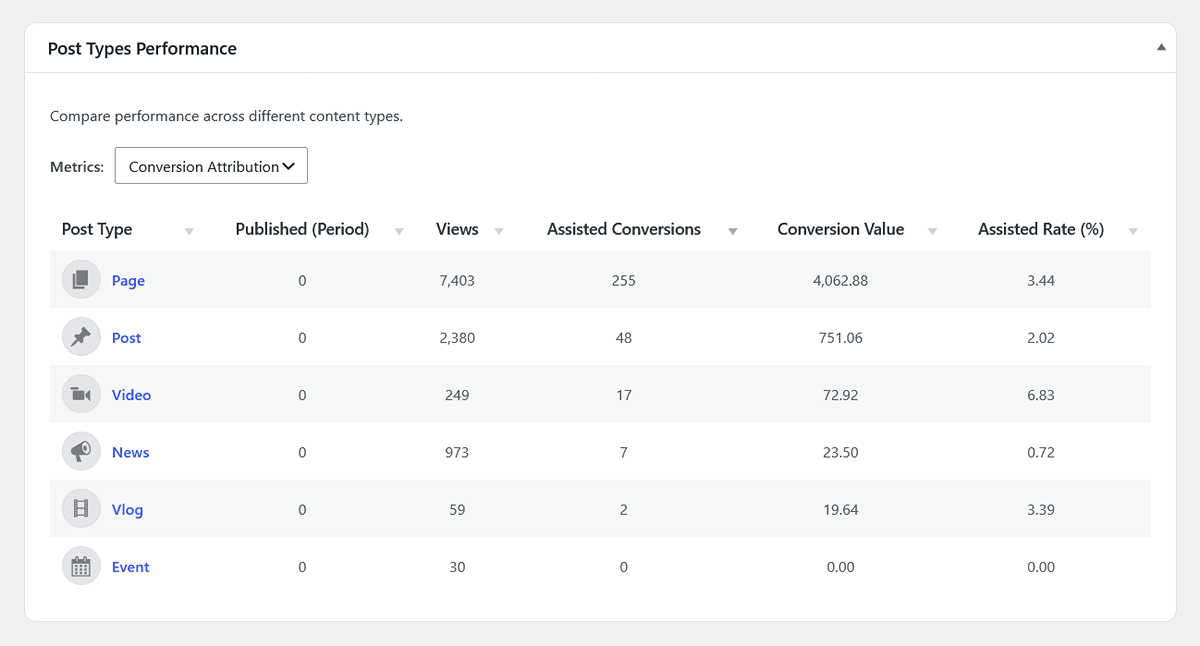
In this example, Pages generate the most assisted conversions and conversion value, while Videos have a much higher assisted rate despite receiving far fewer views. Looking at both traffic and conversion contribution gives a more complete picture of how different content types perform.
You can apply the same conversion attribution metrics to your Authors and Taxonomies (like Categories and Tags).
This is useful for understanding which parts of your WordPress content structure contribute to conversions. You can see which writers produce content that drives leads, or which blog categories contribute the most revenue to your WooCommerce store, rather than simply measuring who gets the most clicks.
Who Benefits from Content Attribution?
Shifting the focus from traffic to assisted conversions is a practical upgrade for anyone producing content, including:
- Content Marketers & Bloggers: To identify which topics actually generate newsletter signups or affiliate clicks.
- SEO Professionals & Agencies: To prove the financial ROI of content marketing efforts to clients, moving beyond simple ranking and traffic metrics.
- Lead Generation Sites & E-commerce: To understand the specific educational pages or product guides that users read before making a purchase or submitting a lead form.
Conclusion
Traffic is important, but conversions are what sustain a website. Understanding exactly which pieces of content contribute to those conversions is where real business insight begins.
By tracking assisted conversions, WP Insights Pro helps bridge the gap between content performance and business outcomes, allowing you to make editorial and marketing decisions based on true contribution rather than just pageviews.
If you are already using WP Insights Pro, you can update to version 1.3.0 to start exploring your conversion attribution data today. To learn more about what WP Insights Pro can do, yo can explore the features.
Ready for Zero-Bloat Analytics?